Building Settings UI
Use the Building Settings panelto change your building’s materials with a different style or time settings, and customize the levels according to your preference.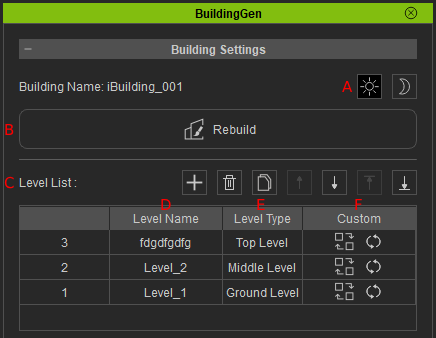
| UI | Name | Function |
| A | Day night Settings | Switching the time icons will change the day and night settings for the selected building in the viewport. |
| B | Rebuild | Selecting this option activates the Rebuilder interface allowing for the reconstruction of existing buildings with diverse styles and configurations. |
| C | Level List | Displays the list of building levels for the selected building, providing various functions for editing the list of levels. |
| D | Level name | Shows the default names of the levels in the building, you can change these names by double-clicking on them. |
| E | Level Type | This section displays the level type for all the levels in the building. There are three types of levels for every default building: top, middle, and ground. |
| F | Custom | Two options are displayed for customizing individual levels. The Rebuild icon  will let you edit your selected level in the Rebuild Level panel, while the Reset icon will let you edit your selected level in the Rebuild Level panel, while the Reset icon  resets the total number of units in the level to its default value. resets the total number of units in the level to its default value.
|
